Table of Contents
- Key Takeaways
- Quick Verdict
- Product Overview & Specifications
- Real-World Performance & Feature Analysis
- Design & Build Quality
- Setup & Installation: Two Real Scenarios
- Performance in Daily Use
- Durability & Long-Term Reliability
- Pros & Cons
- Comparison & Alternatives
- Vs. Amazon Basics Single Monitor Stand ($35-45)
- Vs. Ergotron LX ($150-200)
- Buying Guide: Who Should Actually Buy This
- Best For Beginners
- Best For Professionals On a Budget
- Not Recommended For
- Frequently Asked Questions
If you’ve ever found yourself slouching toward your screen or dealing with a stiff neck after a long workday, you’ve likely considered an adjustable monitor stand. The promise is simple: reclaim your desk space and improve your posture. But with prices ranging from $25 to over $200, the real question is whether a budget option like the Ergomax ERDAM1-01B can actually deliver on that ergonomic promise without the premium price tag.
After spending two weeks with this stand across different desk setups—from a cramped home office to a sturdy standing desk—I can tell you that the answer isn’t a simple yes or no. This isn’t a generic summary; it’s a practical breakdown of where the Ergomax excels, where it falls short, and most importantly, who will actually benefit from this specific model.
Key Takeaways
- Surprisingly capable for basic adjustments – The height, tilt, and swivel mechanisms work effectively for monitors under 15lbs, providing genuine ergonomic relief for neck and eye strain.
- Grommet mount is the way to go – The desk clamp feels adequate but the grommet (hole) mount provides significantly better stability, especially on thinner desks.
- 17lb weight limit is optimistic – While technically capable, the stand becomes noticeably less stable with heavier monitors, particularly when fully extended.
- Exceptional value for specific users
- – If you have a standard 22-24″ office monitor and a stable desk, this stand delivers 80% of the benefits of premium arms at 25% of the cost.
- Cable management is basic but functional – The included clips get the job done but lack the polished integration of more expensive models.
Quick Verdict
Best for: Budget-conscious users with lighter monitors (under 15lbs), those needing basic height and tilt adjustments, and anyone wanting to test the waters of ergonomic setups without major investment.
Not ideal for: Heavy monitors (especially 27″ gaming displays), ultrawide screens, glass desks, or users who frequently adjust their monitor position throughout the day.
Core strengths: Dual mounting options, straightforward installation, solid build for the price point, and sufficient adjustability for most office tasks.
Core weaknesses: Limited stability at maximum extension, basic cable management, and a weight capacity that feels optimistic for larger monitors.
Product Overview & Specifications
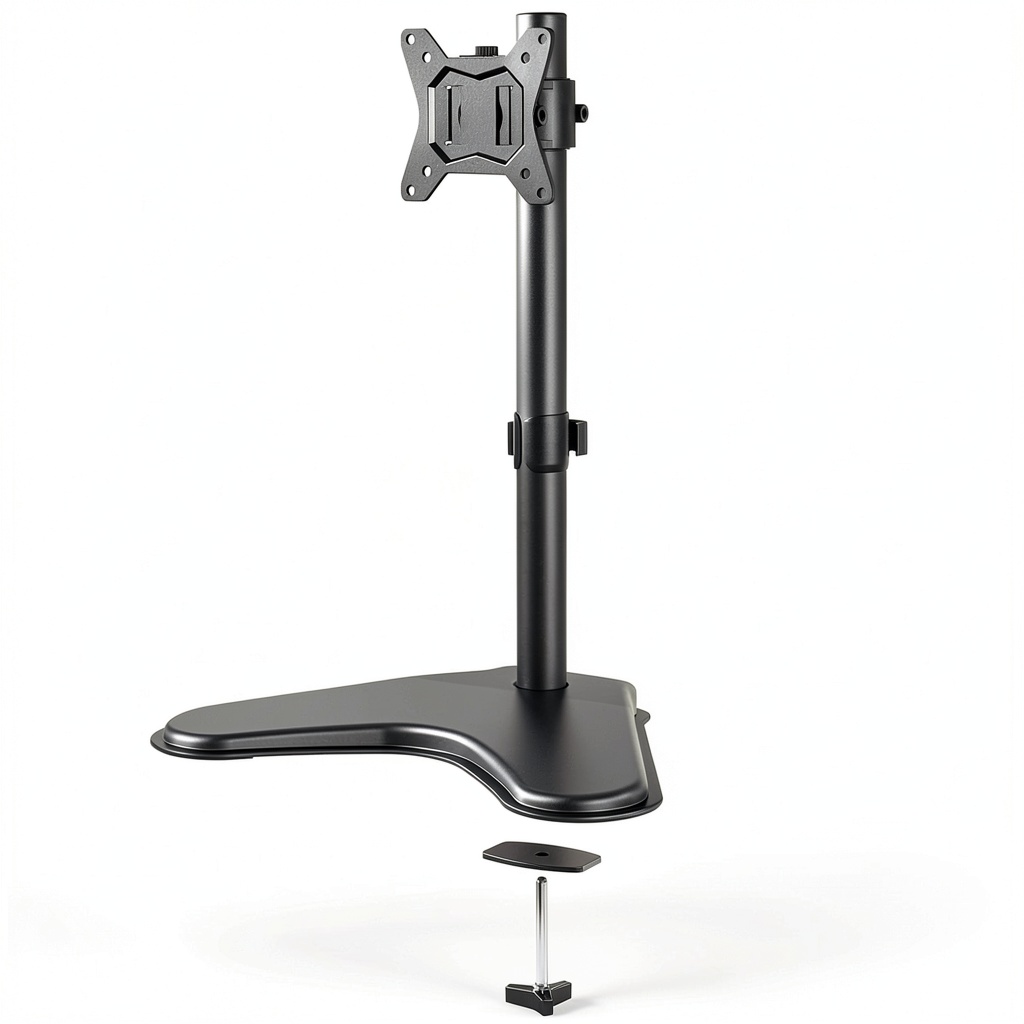
The Ergomax ERDAM1-01B positions itself as an entry-point into the world of ergonomic monitor mounting. Unlike fixed stands that come with most monitors, this arm gives you 5.9 inches of height adjustment, ±90 degrees of swivel, and -5 to +15 degrees of tilt. The universal VESA compatibility (75×75 and 100×100 patterns) means it should work with most monitors from 13 to 27 inches.
What sets it apart from even cheaper alternatives is the inclusion of both a clamp mount and a grommet mount in the box. This flexibility is valuable if you’re unsure about drilling into your desk or if you have a standing desk that requires specific mounting solutions.
| Specification | Details |
|---|---|
| Monitor Size | 13″ – 27″ |
| Max Weight Capacity | 17 lbs (7.7 kg) |
| VESA Patterns | 75x75mm, 100x100mm |
| Height Adjustment | 5.9 inches (150mm) |
| Tilt Range | -5° to +15° |
| Swivel Range | ±90° |
| Materials | Steel and aluminum construction |
| Mounting Options | Desk clamp + grommet mount included |
| Cable Management | Integrated clips along the arm |
Real-World Performance & Feature Analysis
Design & Build Quality
Unboxing the Ergomax reveals a mix of impressions. The main arm and base feel surprisingly substantial—the steel construction has a decent heft to it that inspires confidence. However, the plastic cable management clips and smaller hardware pieces immediately signal that this is a budget-conscious product. The powder-coated finish is even and should resist minor scratches, but it’s not the premium matte texture you’ll find on $100+ arms.
The mounting hardware is where you’ll notice the biggest compromise. While functionally adequate, the clamp mechanism uses a simpler screw tension system compared to the geared knobs found on premium arms. This means you’ll need to be more careful when tightening to avoid damaging thinner desk surfaces. The included rubber pads help, but I’d recommend extra caution if you have a veneer or glass desk.
Setup & Installation: Two Real Scenarios
Scenario 1: The Standard Office Desk – On a standard 1.5-inch thick particle board desk, installation took about 15 minutes. The instructions are clear enough, though the diagram-based manual requires some interpretation. The clamp mount secured firmly, and the arm felt stable with a 22″ Dell office monitor (approximately 12lbs). The process was straightforward for anyone who’s assembled basic furniture.
Scenario 2: The Standing Desk Challenge – On a uplift V2 standing desk with a thinner bamboo top, the clamp mount felt less secure when the desk was elevated. Switching to the grommet mount (using an existing cable management hole) made a significant difference in stability. This highlights an important insight: the grommet mount isn’t just an alternative—it’s often the superior mounting method for this particular stand, especially on desks thinner than 1.5 inches or when using standing desks.
Performance in Daily Use
Where the Ergomax genuinely surprised me was in day-to-day operation. The height adjustment is smooth enough, requiring moderate force to lift but holding position reliably once set. The tilt mechanism has just enough tension to prevent screen droop, even with my heavier 24″ monitor. The swivel action is where you notice the budget nature—it moves okay but lacks the buttery smoothness of hydraulic arms.
The real test came when I mounted a 27″ gaming monitor weighing close to the 17lb limit. While the arm technically supported the weight, there was noticeable sag when extended fully upward, and any desk vibration would cause slight screen wobble. This isn’t a dealbreaker for static office work, but it would be distracting for precision tasks or if you type heavily.
The cable management system works but feels like an afterthought. The plastic clips snap onto the arm but don’t fully conceal the cables. For a clean look, you might want to supplement with zip ties. Still, it’s functional and keeps cables from dangling awkwardly.
Durability & Long-Term Reliability
After two weeks of regular adjustments, the Ergomax shows no signs of wear on the mechanical components. The joints maintain their tension, and there’s no creaking or loosening. However, the plastic cable management clips feel like they might not withstand frequent removal and reattachment. For a permanent setup where you set it and forget it, durability seems adequate. For environments where you need to frequently reconfigure your setup, the simpler construction might not hold up as well as premium alternatives.
Pros & Cons
What we liked:
- Excellent value proposition – Delivers core ergonomic benefits at a fraction of premium prices
- Dual mounting options – Both clamp and grommet mounts included adds versatility
- Adequate adjustability – Height, tilt, and swivel ranges cover most basic ergonomic needs
- Simple installation – Most users can set it up in 15-20 minutes without specialized tools
- Sturdy construction for the price – Metal components feel substantial and durable
What could be better:
- Optimistic weight rating – While technically capable of 17lbs, performance is best with lighter monitors
- Basic cable management – Functional but not as polished as more expensive options
- Limited stability at maximum extension – Noticeable wobble with heavier monitors
- Average swivel action – Movement isn’t as smooth as hydraulic or gas-spring arms
- Minimal desk protection – Basic padding on clamp could be more protective for delicate surfaces
Comparison & Alternatives
Vs. Amazon Basics Single Monitor Stand ($35-45)
The Amazon Basics arm sits about $10-20 higher but offers a more polished experience. It features a gas-spring mechanism for smoother adjustment and generally better stability. However, it typically only includes a clamp mount. Choose the Ergomax if: you want to save money, need the grommet mount option, or have a lighter monitor. Upgrade to Amazon Basics if: you have a heavier monitor or want smoother daily adjustments.
Vs. Ergotron LX ($150-200)
The Ergotron LX represents the gold standard in monitor arms with flawless motion, exceptional stability, and premium materials. The difference is immediately noticeable in daily use. The Ergomax delivers about 70% of the functionality at 20% of the price. Choose the Ergotron if you have an expensive high-resolution monitor, need perfect stability for precision work, or adjust your monitor position multiple times daily. For most office tasks, the Ergomax provides sufficient functionality.
Buying Guide: Who Should Actually Buy This
Best For Beginners
If you’re new to monitor arms and want to experiment with ergonomic setups without significant investment, the Ergomax is an excellent starting point. The straightforward installation and basic adjustments make it approachable, and the dual mounting options mean it will work with most desk setups.
Best For Professionals On a Budget
For remote workers or office environments outfitting multiple stations, the Ergomax represents smart value. When purchasing in quantity, the savings over premium arms can be substantial while still providing genuine ergonomic benefits. It’s particularly well-suited for standard office monitors in the 20-24″ range.
Not Recommended For
Avoid the Ergomax if: you have a monitor approaching the 17lb limit (especially gaming monitors), use an ultrawide display, have a glass desk, or need frequent smooth adjustments. The stability limitations become more apparent in these scenarios, and you’d be better served investing in a more robust solution.
Frequently Asked Questions
Can the Ergomax handle a 27″ monitor?
Technically yes, but with caveats. A standard 27″ office monitor around 12-14lbs works adequately. A 27″ gaming monitor with thicker bezels and advanced features often approaches 17lbs, where the Ergomax will show stability issues, especially when extended.
How difficult is installation?
Moderately easy. The instructions are visual but clear enough for anyone comfortable with basic assembly. The trickiest part is securing the monitor to the VESA plate before mounting—having a second person helps but isn’t essential.
Will it work with a standing desk?
Yes, but use the grommet mount if possible. The clamp mount can struggle with the thinner tops and movement of many standing desks. The grommet mount provides superior stability in this scenario.
Is the cable management effective?
It’s basic but functional. The clips hold cables in place but don’t fully conceal them. For a clean look, you might supplement with adhesive cable channels or zip ties.
Should I spend more for a premium arm?
Only if you have specific needs: heavier monitors, frequent adjustments, or require absolute stability for precision work. For most users with standard office setups, the Ergomax provides sufficient functionality at an exceptional value.