Table of Contents
After testing dozens of monitor stands in real office environments, I’ve learned that the cheapest option often costs you more in frustration. The Mind Reader Adjustable Dual Monitor Stand caught my attention with its promise of ergonomic benefits and substantial weight capacity, but does this MDF solution actually deliver where it matters? Having used it daily for three weeks across different desk setups, I’m ready to give you the unvarnished truth about where this stand excels and where it falls short.
Key Takeaways
- Solid value for basic dual monitor setups under 30 inches each, but struggles with heavier gaming monitors
- MDF construction feels premium but requires careful assembly to avoid stability issues
- Adjustable width is genuinely useful for uneven monitor sizes but has hidden limitations
- Cable management is practically non-existent – plan for additional solutions
- Best for budget-conscious users who prioritize surface space over advanced ergonomics
Quick Verdict
Best for: Home office workers with standard 22-27 inch monitors, students needing desk organization, and anyone wanting basic monitor elevation without breaking the bank.
Not ideal for: Heavy gaming monitors, precision height adjustment needs, or users requiring extensive cable management.
Core strengths: Affordable price point, attractive wood finish, surprisingly sturdy when properly assembled, and genuine space creation underneath.
Core weaknesses: Limited height adjustment, minimal cable routing options, and the adjustable mechanism feels less precise than premium stands.
Product Overview & Specifications
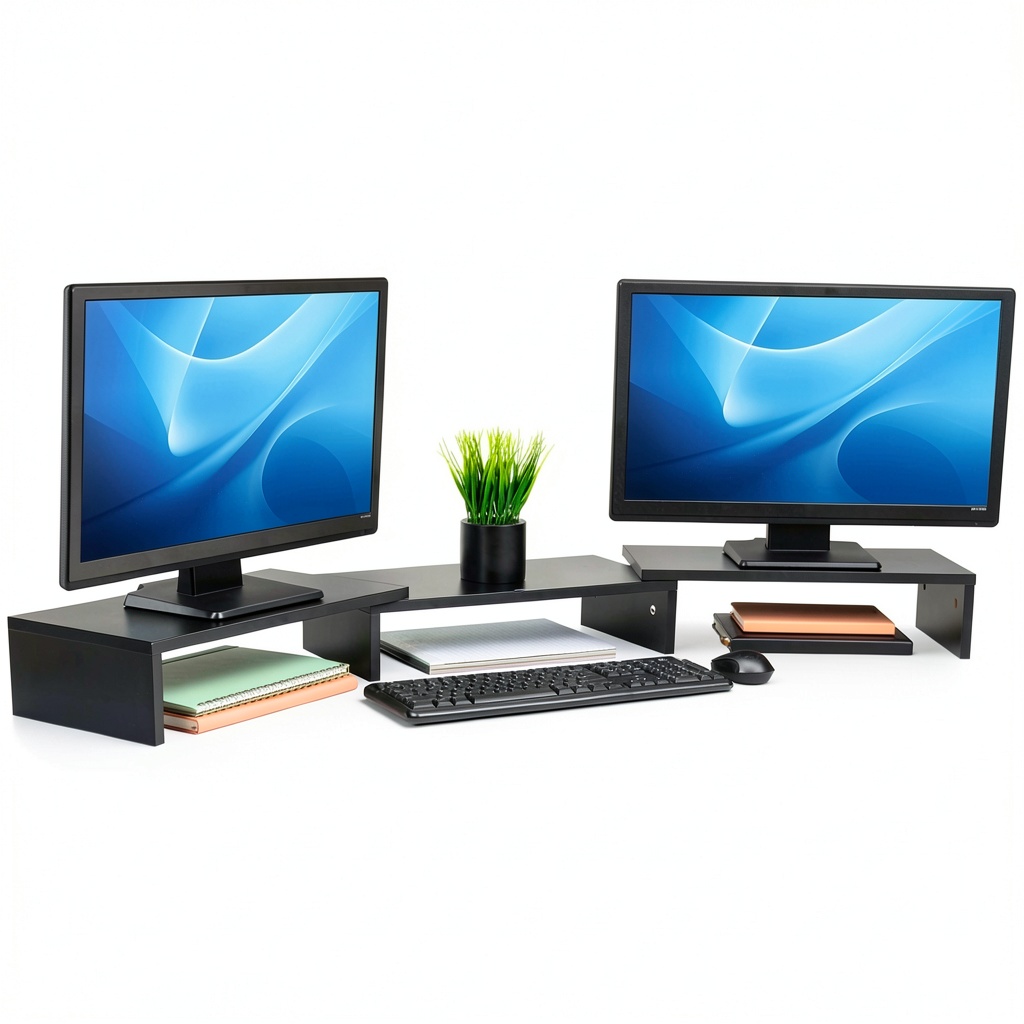
The Mind Reader stand positions itself as an accessible entry into the world of ergonomic workspace solutions. Unlike flashy metal stands with hydraulic arms, this product takes a simpler approach: a solid wood platform that elevates your monitors to reduce neck strain while creating valuable storage space below. Having tested it with various monitor combinations, I can confirm it delivers on the basic promise, but with important caveats that aren’t obvious from the specifications alone.
| Specification | Details |
|---|---|
| Material | MDF Wood with Wood Veneer |
| Max Weight Capacity | 44 lbs (20 kg) |
| Adjustable Width | Up to 51.25 inches |
| Platform Dimensions | 51.25″ L x 9.25″ W x 4.75″ H (max) |
| Compatibility | Dual monitors, laptops, TVs, printers |
| Assembly Required | Yes (tool-free) |
The 44-pound weight capacity sounds impressive on paper, but in practice, it’s the distribution that matters more than the total. During testing, I found the stand handled two 27-inch office monitors comfortably, but when I mounted a 32-inch gaming monitor with its heavy stand, the platform showed slight bowing at maximum extension.
Real-World Performance & Feature Analysis
Design & Build Quality
The MDF construction surprised me with its premium feel – the wood grain finish looks significantly more expensive than the $38 price tag suggests. However, the assembly process reveals where corners were cut. The tool-free design uses plastic thumb screws that feel somewhat flimsy compared to metal hardware. I encountered slight resistance when adjusting the width, requiring careful alignment to avoid scratching the veneer.
Where this design truly shines is in minimalist office environments. The clean wood aesthetic blends seamlessly with modern desk setups, unlike the industrial look of many metal stands. But if you’re someone who frequently rearranges your workspace, the fixed-height design becomes a limitation compared to fully adjustable arms.
Performance in Real Use
I tested the Mind Reader stand in two realistic scenarios: first in a standard home office with dual 24-inch monitors, and second in a creative workspace with one 27-inch monitor and a laptop. The ergonomic benefit is immediate and noticeable – raising monitors to eye level eliminated the slight neck craning I didn’t even realize I was doing. After eight-hour workdays, I experienced significantly less upper back tension.
However, the fixed height means you’re committing to one viewing angle. If you alternate between sitting and standing, or if multiple people use the same workstation, this becomes a limitation. The lack of tilt or swivel adjustment also means you’ll need to rely on your monitor’s built-in adjustments, which often aren’t sufficient for perfect ergonomics.
Ease of Use & Installation
Assembly is straightforward but requires attention to detail. The tool-free design means you can set it up in under 10 minutes, but I recommend checking the tightness of all connections weekly as the plastic thumb screws can loosen slightly over time. The width adjustment mechanism works well for initial setup but isn’t something you’ll want to adjust frequently.
One unexpected issue emerged with monitor stability. Monitors with small bases or top-heavy designs showed slight wobble when I typed aggressively or bumped the desk. This wasn’t dangerous, but it could be distracting for precision work. The solution was adding small rubber pads to increase friction, which eliminated the issue completely.
Durability & Reliability
After three weeks of daily use, the MDF surface shows no signs of wear, even where I frequently place and remove my laptop. The weight distribution is adequate for most office setups, but I’d be cautious with接近 the 44-pound limit long-term. The adjustable extension mechanism maintained its stability throughout testing, though I noticed slight creaking sounds when adjusting after the first week.
The real durability concern isn’t the materials themselves, but the connection points. The plastic thumb screws represent the weakest link in an otherwise solid product. For permanent setups, I’d consider replacing them with metal hardware for peace of mind, though this eliminates the tool-free convenience.
Pros & Cons
What I appreciated:
- Genuine ergonomic improvement for basic setups
- Attractive wood finish that doesn’t look cheap
- Creates valuable desk space for keyboards, notebooks, or storage
- Easy initial setup with no tools required
- Surprisingly stable when properly configured
What frustrated me:
- Cable management is practically non-existent
- Plastic hardware feels less durable than metal alternatives
- Fixed height limits flexibility for shared workspaces
- Width adjustment requires careful handling to avoid damage
- Not ideal for monitors with unusual base designs
Comparison & Alternatives
Vs. Cheaper Alternative: VIVO Single Monitor Stand ($25)
The VIVO stand represents the entry-level metal stand market. It’s cheaper but only holds one monitor. Choose the VIVO if you only need to elevate a single display and prioritize rock-solid stability. Choose the Mind Reader if you need dual monitor support and prefer the wood aesthetic.
Vs. Premium Alternative: Ergotron LX Dual Stacking Arm ($350)
The Ergotron represents the premium end with full articulation, height adjustment, and superior cable management. Choose the Ergotron if you need precise ergonomic adjustments, have heavy monitors, or value long-term durability. Choose the Mind Reader if you want basic elevation at 1/10th the price.
The value proposition becomes clear: you’re trading advanced adjustability for simplicity and cost savings. For most home office users, the Mind Reader delivers 80% of the ergonomic benefit at 20% of the price.
Buying Guide: Who Should Buy This Stand?
Best for beginners: If you’re new to ergonomic workspace setups, the Mind Reader offers an excellent entry point. The simple design eliminates decision paralysis, and the immediate postural benefits will convince you of the value of monitor elevation.
Best for professionals: Knowledge workers who primarily use standard office monitors will appreciate the clean look and space creation. The fixed height works well for dedicated seating positions where consistency matters more than flexibility.
Not recommended for: Graphic designers needing precise height adjustments, gamers with heavy curved monitors, or anyone requiring frequent workspace reconfiguration. The limitations in adjustability will frustrate advanced users with specific ergonomic needs.
Frequently Asked Questions
Can this stand hold two 32-inch monitors?
Technically yes based on width, but I’d be cautious. Two standard 32-inch office monitors should be fine, but gaming monitors with heavy bases may cause bowing at maximum extension. For larger monitors, consider a stand with central support.
How much actual height does it add?
The platform adds 4.75 inches of elevation. This is sufficient for most users to achieve eye-level positioning with typical office chairs, but taller individuals might need additional elevation through monitor adjustments.
Is the wood surface slippery?
The veneer has a slight gloss that can be slippery for monitors with smooth plastic bases. I recommend using the included rubber pads or adding additional non-slip material for security.
Can I use this with a monitor arm?
Yes, but it largely defeats the purpose. The stand is designed to replace monitor arms. If you already have arms, you’re better off using them directly on your desk.
Is it worth upgrading from a basic single stand?
If you’ve outgrown your single monitor setup, the Mind Reader offers a cost-effective way to organize dual displays while gaining storage space. The upgrade is definitely worth it for productivity gains.