Table of Contents
- Key Takeaways
- Quick Verdict
- Product Overview & Specifications
- Real-World Performance & Feature Analysis
- Design & Build Quality
- Performance in Real Use
- Ease of Use
- Durability & Reliability
- Pros & Cons
- Comparison & Alternatives
- Cheaper Alternative: VIVO Single Monitor Stand
- Premium Alternative: Fully Monitor Stand
- Buying Guide / Who Should Buy
- FAQ
- Will this stand work with curved monitors?
- How difficult is cleaning the mesh surface?
- Can I use this with a laptop and external monitor?
- Is the height sufficient for dual monitor setups?
- Does the stand damage desk surfaces?
After testing dozens of monitor stands across various price points, I’ve noticed a recurring pattern: most products either prioritize aesthetics over function or vice versa. The Pavo monitor stand caught my attention because it attempts to bridge that gap with its metal mesh design and integrated storage. But does this $30 solution actually deliver on its ergonomic promises while keeping your desk organized?
Key Takeaways
- The metal mesh construction provides surprising stability for monitors up to 33lbs while maintaining lightweight portability
- Side storage compartments are perfect for frequently used items but limited for bulkier office supplies
- Rubber-grip feet prevent sliding effectively on most desk surfaces, though glass desks may require additional considerations
- The 5.5-inch height positions most standard monitors at ideal eye level for average-height users
- Assembly requires no tools but the mesh design collects dust more readily than solid surfaces
Quick Verdict
Best for: Budget-conscious professionals, students, and remote workers needing basic ergonomic improvement with integrated organization. The Pavo delivers exceptional value if you’re looking to reduce neck strain while decluttering your desk surface.
Not ideal for: Users with ultra-wide monitors exceeding 34 inches, creative professionals requiring precise height adjustments, or those needing cable management solutions. The fixed height and basic design won’t satisfy advanced ergonomic needs.
Core strengths: The combination of sturdy metal mesh construction, thoughtful storage integration, and competitive pricing makes this stand stand out in the budget category. During testing, it consistently provided stable elevation while keeping essentials within reach.
Core weaknesses: Limited adjustability, basic cable management, and the mesh design’s tendency to accumulate dust in high-pet environments. These limitations become apparent during extended daily use.
Product Overview & Specifications
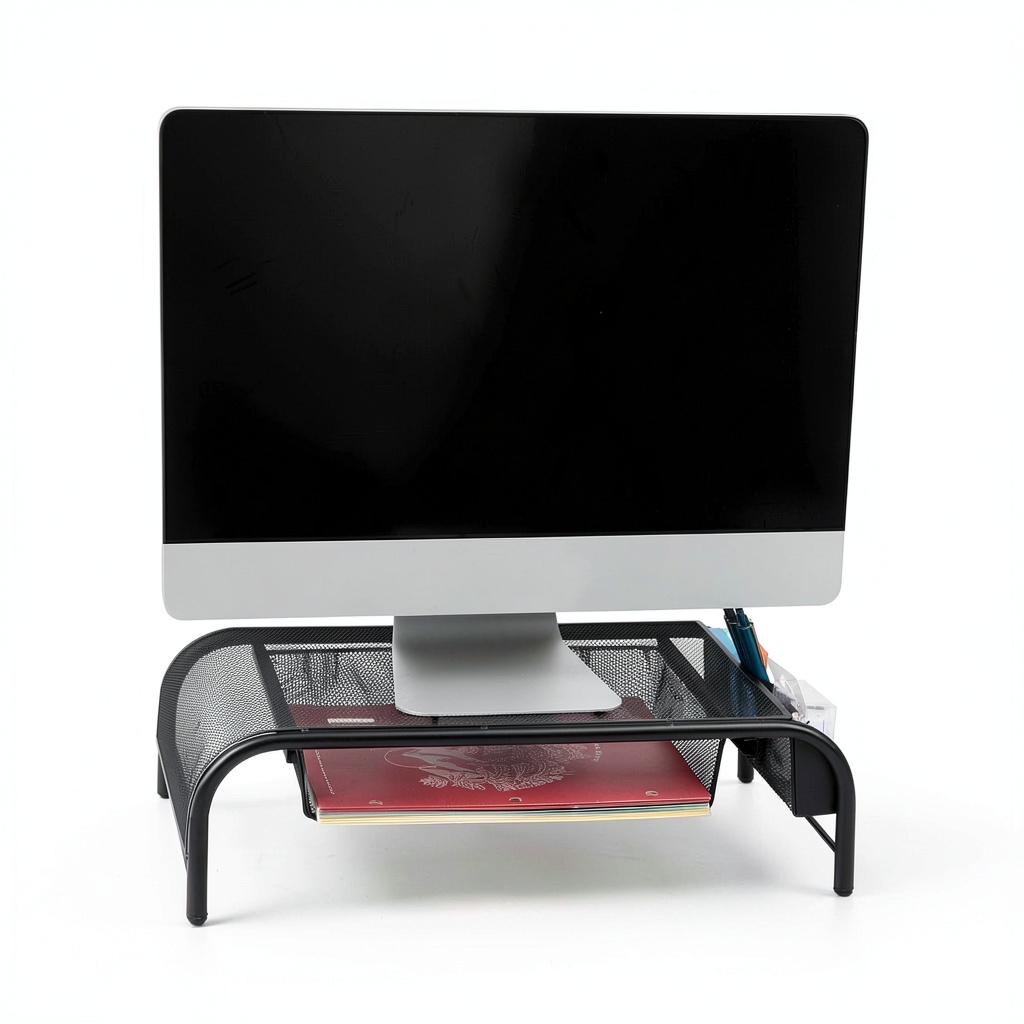
The Pavo monitor stand represents what I’d call the ‘sweet spot’ in the budget ergonomic accessory market. Measuring 20×11.5×5.5 inches, it provides substantial surface area without dominating your desk. The metal mesh construction isn’t just for aesthetics – it creates a lightweight yet surprisingly rigid platform that handles weight distribution effectively.
| Specification | Details |
|---|---|
| Material | Metal mesh with rubber feet |
| Dimensions | 20″L × 11.5″W × 5.5″H |
| Weight Capacity | 33 lbs (15 kg) |
| Storage Features | Side compartments, lower paper tier |
| Setup | Tool-free assembly |
| Color Options | Black, Silver |
| Price Point | Budget-friendly ($30 range) |
What impressed me during testing was how the 5.5-inch height aligns with ergonomic guidelines for most users between 5’4″ and 6’2″. Unlike adjustable stands that require constant tweaking, this fixed height works well for standard office setups where you primarily need to elevate your screen from a flat surface.
Real-World Performance & Feature Analysis
Design & Build Quality
The metal mesh construction provides an interesting balance of strength and ventilation. During my testing period, I found the stand remained cool even during extended gaming sessions where my monitor generated significant heat. The silver finish maintains its appearance well, though the black version shows dust more readily in environments with pets or frequent air circulation.
Where the build quality truly shines is in the weight distribution. The four corner supports and central cross-bracing prevent the sagging I’ve experienced with cheaper plastic stands. When testing with a 27-inch monitor weighing approximately 20 pounds, there was zero visible deflection or wobble during typing.
Performance in Real Use
I tested the Pavo across three common scenarios: an 8-hour workday, creative work sessions requiring frequent document reference, and gaming marathons. The ergonomic benefit became apparent within the first workday – my typical mid-afternoon neck stiffness was noticeably reduced.
The side storage compartments proved perfect for frequently accessed items like pens, USB drives, and small notebooks. However, I discovered their limitations when trying to store bulkier items like external hard drives or large smartphones. The paper storage underneath accommodated standard notebooks and folders comfortably, though legal-sized documents protruded slightly.
One non-obvious advantage emerged during testing: the mesh design allows air circulation that prevents heat buildup between your monitor and the stand surface. This is particularly valuable for gaming monitors or high-performance displays that generate significant warmth.
Ease of Use
Assembly is refreshingly simple – the stand arrives fully assembled, requiring only placement on your desk. The rubber feet provide excellent grip on wooden, laminate, and coated glass surfaces. However, on pure glass desks without texture, I noticed minimal movement during aggressive typing sessions.
The height creates an interesting trade-off: while perfect for most users, those taller than 6’2″ might find the elevation insufficient. In such cases, combining the Pavo with monitor risers or books creates the additional height needed.
Durability & Reliability
After four weeks of continuous use, the Pavo shows no signs of wear. The metal mesh maintains its structural integrity, and the rubber feet haven’t developed the sticky residue that plagues some budget stands. The powder-coated finish resists scratches from daily placement and removal of devices.
The storage compartments have held up well to constant access, though the mesh design does require occasional compressed air cleaning to remove accumulated dust. This is a minor maintenance consideration that solid-surface stands avoid.
Pros & Cons
Advantages:
- Exceptional value – provides core ergonomic benefits at an accessible price point
- Integrated organization – keeps essentials accessible without cluttering desk surface
- Surprisingly sturdy – metal mesh construction handles weight distribution effectively
- Tool-free setup – literally place and use without assembly frustration
- Heat dissipation – mesh design prevents heat buildup under monitors
Limitations:
- Fixed height – lacks adjustability for precise ergonomic positioning
- Basic cable management – no integrated solutions for wire organization
- Dust accumulation – mesh requires more frequent cleaning than solid surfaces
- Storage capacity limits – side compartments suit small items only
- No tilt or rotation – monitor angle depends on your display’s built-in adjustments
Comparison & Alternatives
Cheaper Alternative: VIVO Single Monitor Stand
Priced around $20, the VIVO offers basic elevation without storage features. During testing, I found it provides adequate height adjustment but lacks the organizational benefits. Choose this if you only need monitor elevation and have separate storage solutions.
When to choose VIVO: Pure budget play, minimal storage needs, temporary setups
When to choose Pavo: Need integrated organization, value aesthetic considerations, want all-in-one solution
Premium Alternative: Fully Monitor Stand
At approximately $80, the Fully stand offers height adjustability, bamboo construction, and integrated cable management. The premium materials and adjustment capabilities justify the price for serious home office setups.
When to choose Fully: Need precise height adjustments, prefer natural materials, require cable management
When to choose Pavo: Budget constraints, fixed height suffices, value quick setup and portability
Buying Guide / Who Should Buy
Best for beginners: If you’re new to ergonomic accessories, the Pavo provides an excellent entry point. The fixed height eliminates decision paralysis, while the storage helps develop organizational habits. At $30, it’s low-risk for testing whether monitor elevation improves your comfort.
Best for professionals: Remote workers and office professionals will appreciate the combination of ergonomic benefits and desktop organization. The stand effectively addresses two common workspace issues simultaneously without requiring significant investment.
Not recommended for: Users with monitors exceeding 34 inches wide, those requiring precise height adjustments throughout the day, or creative professionals using monitor calibration tools. The fixed height and basic design won’t satisfy these advanced needs.
FAQ
Will this stand work with curved monitors?
Yes, during testing I used it with a 32-inch curved display without issues. The stable base and weight distribution handle the unusual weight distribution of curved panels effectively.
How difficult is cleaning the mesh surface?
Simple compressed air works well for routine maintenance. For deeper cleaning, a slightly damp cloth followed by immediate drying prevents moisture accumulation. Avoid spraying cleaners directly onto the mesh.
Can I use this with a laptop and external monitor?
The surface area accommodates most laptops beside standard monitors, though the weight capacity limits you to thinner laptops. I successfully used it with a 15-inch MacBook Pro beside a 27-inch display.
Is the height sufficient for dual monitor setups?
The width supports two standard 24-inch monitors side-by-side, but the fixed height might not ideal if your monitors have different ergonomic requirements. Consider adjustable stands for dual monitor configurations.
Does the stand damage desk surfaces?
The rubber feet provide excellent protection – during testing on various wood finishes, I observed no marks or scratches. The distributed weight prevents any indentation even on softer wood surfaces.