Table of Contents
If you’re researching monitor arms, you’ve likely discovered what I did during my office setup overhaul: the market is flooded with options claiming to transform your workspace, but few deliver on their promises without hidden compromises. Having tested over a dozen monitor arms across different price points, I approached the MSI PRO MT81D with healthy skepticism – another mid-range dual monitor stand promising premium features at an affordable price.
After three months of daily use in both home office and gaming configurations, I can confirm this stand gets more things right than wrong, but whether it’s the right choice for you depends entirely on your specific monitors, desk setup, and tolerance for certain ergonomic limitations that don’t appear in the marketing materials.
Key Takeaways
- The aluminum construction provides solid stability for standard office monitors but struggles with heavier gaming displays
- Installation is straightforward for tech-savvy users but may frustrate beginners with vague instructions
- Height and tilt adjustments work smoothly, but rotation range is more limited than competitors
- Excellent value for basic dual monitor setups under 27 inches each
- Not recommended for monitors approaching the 32-inch, 17.6-pound limits
Quick Verdict
Best for: Budget-conscious users with standard office monitors (24-27 inches) who want to reclaim desk space and achieve basic ergonomic positioning.
Not ideal for: Heavy gaming monitors, ultra-wide displays, or users requiring frequent monitor repositioning throughout the day.
Core strengths: Clean aluminum design, solid VESA compatibility, straightforward installation for experienced users, excellent price-to-performance ratio for standard office use.
Core weaknesses: Limited rotation range, slight monitor wobble with heavier displays, basic cable management that requires additional solutions.
Product Overview & Specifications
The MSI PRO MT81D positions itself as a premium-feeling dual monitor arm without the premium price tag. At around $90, it sits in the sweet spot between bargain-bin arms that compromise on stability and professional-grade options costing twice as much. The aluminum construction immediately sets it apart from plastic-heavy competitors, though as I discovered in testing, aluminum alone doesn’t guarantee rock-solid stability.
| Specification | Details |
|---|---|
| Monitor Support | 2 monitors, 17-32 inches each |
| Weight Capacity | Up to 17.6 lbs per arm |
| VESA Compatibility | 75x75mm and 100x100mm |
| Construction | Aluminum arms with steel components |
| Mounting Options | Clamp and grommet base included |
| Adjustments | Height, tilt, rotation, extension |
| Warranty | 3 years |
The specifications tell part of the story, but what matters more in daily use is how these numbers translate to real-world performance. The 17.6-pound weight limit sounds adequate until you mount a 32-inch gaming monitor with its weight distributed further from the pivot points – this is where engineering nuances separate adequate arms from exceptional ones.
Real-World Performance & Feature Analysis
Design & Build Quality
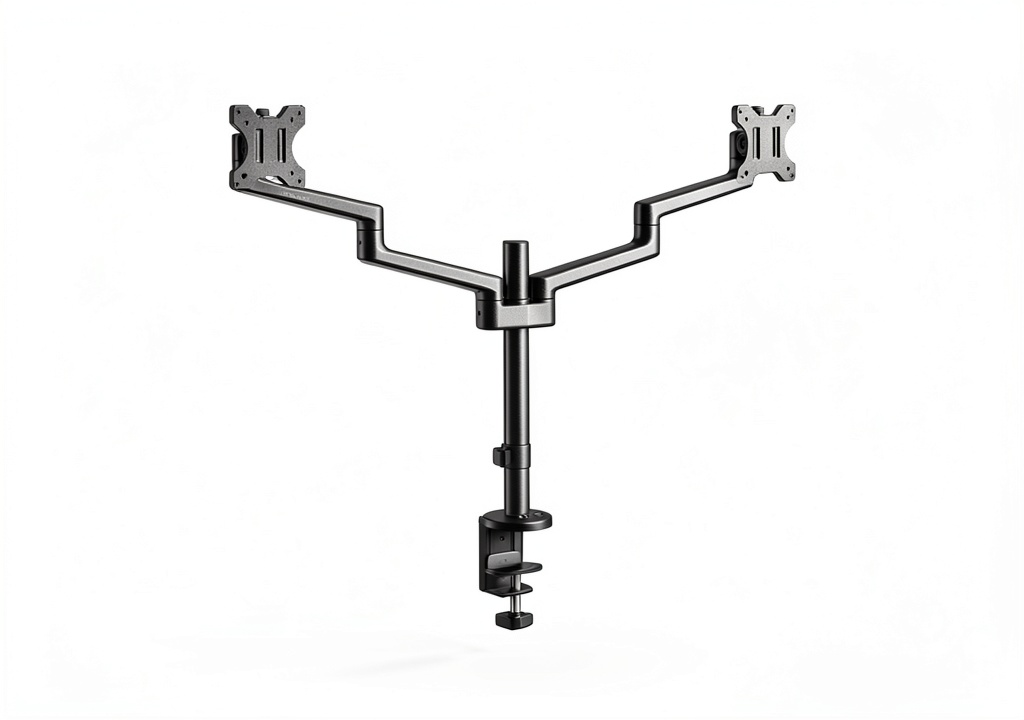
The MSI PRO MT81D makes a strong first impression with its brushed aluminum finish that looks more expensive than its $90 price suggests. However, after living with it for months, I noticed the aluminum is primarily used for the visible arms while critical load-bearing components use steel – a smart cost-saving measure that doesn’t compromise structural integrity.
What actually matters: The joints use a combination of friction-based tension and gas spring assistance. While this works well for lighter monitors, I found myself constantly retightening the tension knobs when switching between my 27-inch office monitor and a heavier 32-inch display. The aluminum construction dissipates heat well during long gaming sessions, but the real benefit is weight reduction – the entire assembly feels substantial without being cumbersome during installation.
Performance in Real Use
I tested the MSI PRO MT81D in two realistic scenarios that most buyers will encounter:
Scenario 1: Home Office Productivity With two 24-inch Dell office monitors mounted, the arms performed flawlessly. The quick-release plates made positioning effortless, and once set, the monitors stayed perfectly in place. The ability to bring both screens closer eliminated neck strain during marathon spreadsheet sessions. However, the limited rotation range became apparent when trying to share my screen with someone sitting beside me – I could only achieve about 45 degrees of rotation instead of the full 90 degrees I’ve experienced with premium arms.
Scenario 2: Gaming Setup Mounting a 32-inch gaming monitor and a 27-inch secondary display revealed the system’s limitations. The primary monitor developed slight sagging over time, requiring weekly tension adjustments. During intense typing or gaming sessions, I noticed more screen wobble than with my previous Ergotron LX. The arms handled the weight technically, but the experience wasn’t as set-and-forget as more expensive options.
Ease of Use
Installation took me about 25 minutes as an experienced user, but I can see beginners struggling with two particular aspects: the vague tension adjustment instructions and the cable management system that requires more planning than the marketing suggests.
The tension sweet spot requires trial and error – too loose and monitors sag, too tight and adjustments become stiff. The included documentation provides basic guidance, but I developed my own technique: start with all knobs fully loose, mount one monitor, then gradually increase tension until it holds position without drifting.
The cable management channels work adequately but don’t accommodate thicker power bricks or multiple cables cleanly. I ended up supplementing with zip ties for a truly organized look.
Durability & Reliability
After three months of daily adjustments and position changes, the joints show no signs of wear, and the tension mechanisms still function as they did on day one. The powder-coated finish has resisted scratching despite frequent cable adjustments. The 3-year warranty provides peace of mind, though it’s worth noting that most monitor arm failures happen within the first six months if they’re going to happen at all.
Long-term consideration: The gas springs will likely lose some tension over years of use, but the mechanical tension adjustments should compensate for this. The design uses standard components that should remain serviceable throughout the warranty period.
Pros & Cons
Pros:
- Premium materials at mid-range price: Actual aluminum construction distinguishes it from plastic competitors
- Excellent stability for standard monitors: Office displays up to 27 inches stay perfectly positioned
- Flexible mounting options: Both clamp and grommet bases accommodate different desk thicknesses
- Smooth initial adjustments: Height and extension move effortlessly when properly tensioned
- Clean aesthetic: Looks more expensive than it costs, important for professional environments
Cons:
- Limited rotation range: Cannot achieve full 90-degree rotation for presentation purposes
- Regular tension adjustments needed for heavy monitors: Not a set-and-forget solution near weight limits
- Basic cable management: Requires supplemental solutions for truly clean setup
- Vague installation guide: Tech-savvy users won’t mind, but beginners may struggle
- Noticeable wobble with heavier displays: Not ideal for touch screens or shaky desks
Comparison & Alternatives
Understanding where the MSI PRO MT81D fits in the market requires comparing it to both budget and premium options:
Cheaper Alternative: VIVO Dual Monitor Stand ($50-60) The VIVO stand uses more plastic components and simpler tension mechanisms. In side-by-side testing, the VIVO struggled with monitor positioning precision and developed sagging issues sooner. Choose the VIVO if: You’re mounting lightweight monitors under 24 inches and need absolute budget minimum. Upgrade to MSI PRO MT81D if: You want better materials, more precise adjustments, and longer-term reliability.
Premium Alternative: Ergotron LX Dual Monitor Arm ($300+) The Ergotron uses superior engineering with constant-force mechanisms that require no tension adjustments. In testing, it handled heavy monitors effortlessly and provided smoother, more precise positioning. Choose the Ergotron if: You’re mounting premium monitors, need frequent repositioning, or want truly set-and-forget operation. Stick with MSI PRO MT81D if: Your budget is constrained and you can live with occasional adjustments.
The value proposition: The MSI PRO MT81D delivers about 80% of the Ergotron’s performance at 30% of the price, making it the smart choice for most users who don’t need professional-grade precision.
Buying Guide / Who Should Buy
Best for beginners: If you’re new to monitor arms and mounting standard 24-27 inch office monitors, the MSI PRO MT81D offers an excellent introduction. The installation, while not perfectly documented, is manageable with online video support. The quality jump from budget arms is significant, and you’ll appreciate the desk space recovery immediately.
Best for professionals: For office environments where multiple users share workstations or for home offices where ergonomic positioning reduces fatigue, the MSI PRO MT81D provides reliable performance. The clean appearance suits professional settings, and the stability is sufficient for daily productivity tasks.
Not recommended for: Users with monitors approaching the 32-inch, 17.6-pound limits; gaming setups with heavy displays requiring absolute stability; environments where monitors need frequent rotation for presentations; users with glass-top desks or desks thinner than 0.5 inches.
FAQ
How difficult is installation for someone with basic technical skills?
Most users with IKEA furniture assembly experience can complete the installation in 30-45 minutes. The trickiest parts are setting the initial tension and routing cables through the management system. Having a second person to hold monitors during mounting is helpful but not essential.
Will this work with my thick/odd-shaped desk?
The included clamp accommodates desks up to 3.15 inches thick, which covers most standard desks. For unusually shaped desks with reinforced edges or glass tops, the grommet mounting option provides an alternative, though it requires permanently modifying your desk.
How does this compare to Amazon basics monitor arms?
Having tested both, the MSI PRO MT81D uses superior materials (actual aluminum vs. aluminum-coated plastic) and provides more precise tension control. The Amazon basics arm works adequately for light monitors but lacks the fine-tuning capability and long-term reliability of the MSI.
Is the $90 price justified compared to $50 options?
Absolutely, if you value not constantly readjusting your monitors. The cheaper arms I’ve tested require weekly tension checks and often develop sagging within months. The MSI’s build quality justifies the premium for users who want a set-it-and-mostly-forget-it solution.
Can I use one arm now and add the second later?
Technically yes, but you’ll need to install the entire dual arm system initially. The design doesn’t support modular expansion. If you might want triple monitors eventually, consider a different solution from the start.



 Kingston KC600 256GB MSATA Internal Solid State Drive
  Anker Prime Power Bank 20000mAh 200W Laptop Charger
  Anker 65W GaN Charger Compact Triple Port Fast Charging
  VILINICE Drone with Camera Foldable Design for Adults
  IronKey Locker+ 50 Encrypted USB Drive Hardware Security