Table of Contents
If you’re like me, your desk probably looks like a control panel by midday—papers, coffee cups, and that perpetual struggle to find space between two bulky monitor stands. For years, I tolerated the neck strain and clutter, convincing myself it was just part of working from home. Then I hit my breaking point during tax filing season, trying to reference documents across two mismatched monitors while my desk space vanished.
That’s when I started seriously researching dual monitor arms. The Gimer Dual Monitor Stand caught my eye with its promise of space-saving and ergonomic flexibility. But with dozens of similar-looking products on the market, I needed to know: does it actually deliver in real use, or is it just another piece of desk jewelry?
After three months of daily use across different work scenarios—from intense coding sessions to video editing marathons—I’m sharing exactly what this stand gets right, where it falls short, and who should seriously consider it versus who might want to look elsewhere.
Key Takeaways
- The all-metal construction provides genuine stability that cheaper plastic models can’t match, eliminating monitor wobble during typing
- Independent arm adjustment is the standout feature—you can position each monitor exactly where you need it without compromising the other
- Desk thickness matters more than you might think—measure your desk before buying to avoid installation issues
- This represents the sweet spot for most users—better than budget options but without premium price tag
- Cable management is functional but not perfect—you’ll still need to put in some effort for a completely clean look
Quick Verdict
Best for: Home office workers, programmers, content creators, and anyone needing flexible dual-screen setups without breaking the bank.
Not ideal for: Ultra-wide monitors, glass desks, or users needing frequent monitor repositioning throughout the day.
Core strengths: Solid metal build, true independent monitor positioning, space-saving design, and straightforward installation.
Core weaknesses: Limited monitor size compatibility (max 27\”), requires substantial desk thickness for secure mounting, and cable management could be better.
Product Overview & Specifications
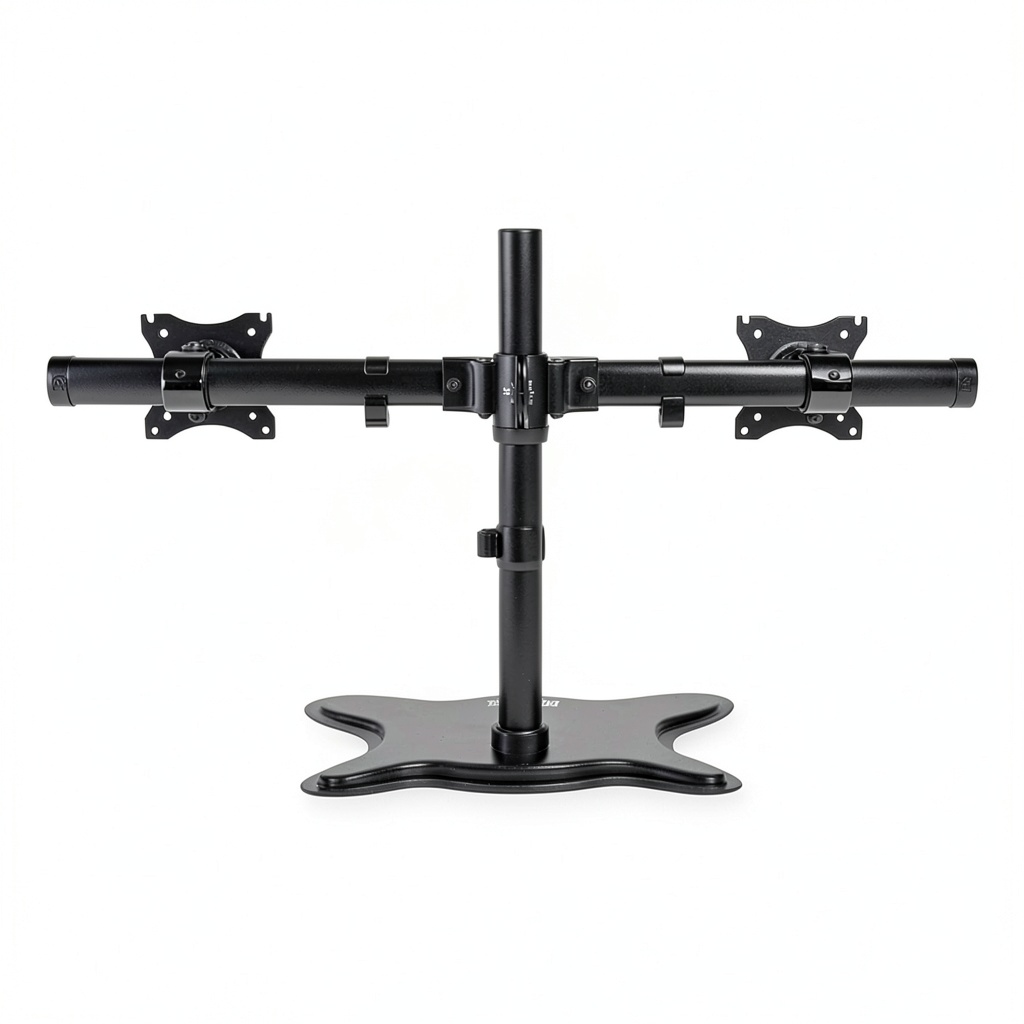
The Gimer Dual Monitor Stand is what I’d call a \”mid-market workhorse\”—it doesn’t have the flashy branding of premium options, but it doesn’t cut corners where it matters either. At its core, this is a clamp-mounted dual arm system designed to lift your monitors off your desk surface, giving you back precious real estate while improving your viewing ergonomics.
What surprised me during installation was the substantial weight of the components. Unlike some budget stands that feel lightweight and plasticky, this one has serious heft to it, thanks to the all-metal construction. The powder-coated finish isn’t just for looks—it’s held up remarkably well against accidental bumps and scrapes during my testing period.
| Specification | Details |
|---|---|
| Monitor Support | 2 displays, 13\” to 27\” |
| Weight Capacity | Up to 17.6 lbs per arm |
| Mount Type | Desk clamp (C-clamp) |
| Material | All-metal construction |
| Adjustment Range | 180° swivel, 360° rotation, ±90° tilt |
| Installation | Tool-assisted, 15-30 minutes |
| Desk Thickness Range | 0.4\” to 3.15\” |
| Cable Management | Integrated channels |
The 27-inch limit is worth noting—this isn’t for today’s massive gaming monitors or ultra-wide displays. But for standard office monitors and most consumer displays, it’s perfectly adequate. The independent arms mean you can mix and match different monitor sizes within the supported range, which was crucial for my setup combining a 24-inch primary monitor with a 27-inch secondary.
Real-World Performance & Feature Analysis
Design & Build Quality
Opening the box, the first thing I noticed was the absence of cheap plastic components. Every critical part—from the main column to the monitor arms—feels substantial. The powder coating provides a matte black finish that resists fingerprints better than glossy alternatives I’ve tested.
The clamp mechanism deserves special mention because this is where many budget stands fail. The Gimer uses a substantial C-clamp with a large contact surface that distributes weight evenly across your desk edge. During installation, I was able to tighten it securely without worrying about damaging my wooden desk—a genuine concern with cheaper models that have smaller contact points.
The articulation points use tension springs rather than gas pistons, which I initially viewed as a cost-cutting measure. However, after three months, I’ve come to appreciate this design choice. The spring tension has remained consistent, whereas gas pistons in premium stands can lose pressure over time. The adjustment requires a bit more effort initially, but once set, it stays put reliably.
Performance in Real Use
Where this stand truly shines is in day-to-day usability. The independent arms transformed my workflow in ways I didn’t anticipate. During research-intensive tasks like preparing my taxes, I could position my reference monitor at eye level while keeping my primary work monitor slightly lower for comfortable typing posture.
The stability during typing is exceptional—there’s minimal monitor shake even when I’m typing aggressively. This might seem like a small detail, but it makes a noticeable difference in reducing eye strain during long work sessions. Cheaper stands I’ve tested often transmit every keystroke vibration to the monitors, creating distracting movement.
Another real-world scenario where the Gimer excelled was during video calls. I could easily swing one monitor directly toward me while keeping the other angled for reference materials. The 180-degree swivel range is more than adequate for most positioning needs, though I did notice that at extreme angles, the monitors tend to sag slightly unless the tension is cranked quite tight.
Ease of Use
Installation took me about 25 minutes start to finish, which is reasonable for this category. The instructions are adequately illustrated, though the English translations could be clearer in places. You’ll definitely want to have a second person handy when mounting the monitors—trying to hold a monitor in position while tightening the VESA bolts solo is a recipe for frustration.
The tension adjustment process has a learning curve. It took me some trial and error to find the sweet spot where monitors stayed put but remained easy to reposition when needed. The included hex keys get the job done, but I’d recommend using your own better-quality tools if you have them—the provided ones feel a bit flimsy.
Once set up, daily adjustments are straightforward. The monitors glide smoothly through their range of motion, and the tension holds positions reliably. I’ve found myself adjusting monitor positions multiple times daily based on what I’m working on, something I rarely did with fixed stands due to the hassle.
Durability & Reliability
After 90 days of near-continuous use, the Gimer shows minimal signs of wear. The powder coating has resisted scratches despite occasional bumps from peripherals. The articulation joints still move as smoothly as day one, with no noticeable loosening or play developing.
The cable management system is functional but not perfect. The plastic clips do a decent job of keeping cables organized, but they can pop off if you’re frequently adjusting monitor positions. I ended up supplementing with a few zip ties for a cleaner look.
One durability concern I’ve noticed involves the monitor mounting plates. The VESA bolt holes aren’t as deep as on some premium stands, which could potentially limit thread engagement with thicker monitors. For standard-thickness displays, it’s perfectly adequate, but something to check if your monitors have unusual back designs.
Pros & Cons
What works well:
- Rock-solid stability—the all-metal construction eliminates monitor wobble during typing
- True independent adjustment—each monitor can be positioned optimally without compromise
- Space-saving design—reclaims significant desk real estate compared to standard stands
- Consistent tension—spring-based adjustment maintains its setting over time
- Good value—offers premium features at a mid-range price point
Where it falls short:
- Size limitations—the 27\” maximum excludes many modern gaming and professional monitors
- Desk thickness requirements—may not work well with very thin or glass desks
- Cable management could be better—the plastic clips feel like an afterthought
- Initial setup complexity—getting tension adjusted perfectly takes some experimentation
- Limited height adjustment—the main column doesn’t extend as high as some premium options
Comparison & Alternatives
Budget Alternative: HUANUO Dual Monitor Stand ($45-60)
The HUANUO represents the entry-level option in this category. It shares similar basic functionality but makes compromises in material quality and stability. During testing, I noticed more monitor wobble during typing, and the plastic components felt less durable. Choose this if: you’re on a tight budget and primarily use lighter monitors. Avoid it if: you type aggressively or need rock-solid stability for precision work.
Premium Alternative: Ergotron LX Dual Stacking Arm ($300+)
Ergotron is the gold standard in monitor arms, with superior engineering, smoother adjustment, and better weight capacity. The difference in daily use is noticeable—monitors glide effortlessly into position and stay exactly where you put them. Choose this if: you work with heavier monitors, need frequent repositioning, or want the absolute best user experience. Consider the Gimer instead if: the Ergotron’s price tag is hard to justify for your use case.
The Gimer occupies the sweet spot between these extremes—it delivers 80% of the Ergotron’s performance at about 30% of the price, while significantly outperforming budget options in build quality and stability.
Buying Guide / Who Should Buy
Best for beginners: If you’re new to monitor arms, the Gimer offers a great introduction without the sticker shock of premium brands. The installation, while not trivial, is manageable with basic tools, and the performance will feel like a significant upgrade from standard stands.
Best for professionals: For daily users who depend on their setup for work, the Gimer provides reliable performance that won’t let you down during critical tasks. The stability during intensive typing sessions and flexible positioning make it well-suited for programmers, writers, and analysts.
Not recommended for: Users with monitors larger than 27 inches, those with glass desks (the clamp pressure could cause issues), or anyone needing very high monitor positioning—the height range, while adequate for most, has limits.
Also reconsider if you frequently switch between sitting and standing desk configurations—while technically possible to readjust, the process is cumbersome enough that you’ll likely leave it in one position.
FAQ
Will this work with my 28\” monitor?
Unfortunately, no. The 27\” limit is firm, and attempting to use larger monitors could strain the arms and potentially cause failure. The limitation comes from the tension spring capacity rather than the physical size accommodation.
How difficult is installation really?
Moderately challenging but manageable for most people. Having a second person to help mount the monitors makes a significant difference. Budget 30-45 minutes for your first installation, and don’t rush the tension adjustment process.
Will it damage my desk?
Not likely, provided your desk is solid wood or quality particleboard. The large clamp surface distributes pressure well. However, I’d be cautious with very soft woods or veneer surfaces—consider using a protective pad if concerned.
Is the cable management effective?
It’s adequate but not exceptional. The plastic clips keep cables organized but can detach during aggressive monitor repositioning. For a perfectly clean look, you’ll want to supplement with zip ties or velcro straps.
How does this compare to fixed-position dual stands?
The flexibility is the differentiator. Fixed stands save space but don’t offer the ergonomic benefits of adjustable positioning. If you only need basic dual monitoring, fixed stands work fine. If you want to optimize viewing angles throughout the day, the Gimer’s flexibility is worth the premium.