Table of Contents
- Key Takeaways
- Quick Verdict
- Product Overview & Specifications
- Real-World Performance & Feature Analysis
- Design & Build Quality
- Performance in Real Use
- Ease of Use & Installation
- Durability & Reliability
- Pros & Cons
- Comparison & Alternatives
- Cheaper Alternative: Mount-It! Basic Monitor Stand ($25-35)
- Premium Alternative: Fully Jarvis Monitor Arm ($150-200)
- Buying Guide: Who Should Buy This Stand
- Best For Beginners
- Best For Professionals
- Not Recommended For
- Frequently Asked Questions
I’ve tested more monitor stands than I can count, from cheap plastic risers to premium motorized mounts. When I first unboxed this bamboo monitor stand, I’ll admit I was skeptical. Another bamboo accessory promising ergonomic benefits and sustainability – but does it actually deliver where it matters? After using it daily for three months across different desk setups, I’ve discovered both the genuine benefits and the real limitations that product descriptions usually gloss over.
The core problem this stand attempts to solve is universal: most monitors sit too low, forcing us into poor posture that accumulates into real physical strain over time. But not every solution works for every user, and the material choice introduces unique considerations beyond just height adjustment.
Key Takeaways
- Genuine ergonomic improvement – Proper monitor elevation significantly reduces neck strain for average-height users
- Sustainability comes with trade-offs – Bamboo looks great but requires different care than metal stands
- Weight capacity matters more than you think – Works well with standard monitors but struggles with heavier setups
- Real stability depends on your desk surface – Glass or uneven surfaces may require additional solutions
- Value proposition is situational – Ideal for eco-conscious users, but not necessarily the most practical choice
Quick Verdict
Best for: Eco-conscious home office users with standard monitors seeking basic ergonomic improvement and natural aesthetics.
Not ideal for: Heavy monitors (over 25lbs), multi-monitor setups, or users needing height adjustability.
Core strengths: Sustainable materials, attractive design, effective basic elevation, good stability for lightweight setups.
Core weaknesses: Limited weight capacity, no adjustability, potential for surface scratching on delicate desks.
Product Overview & Specifications
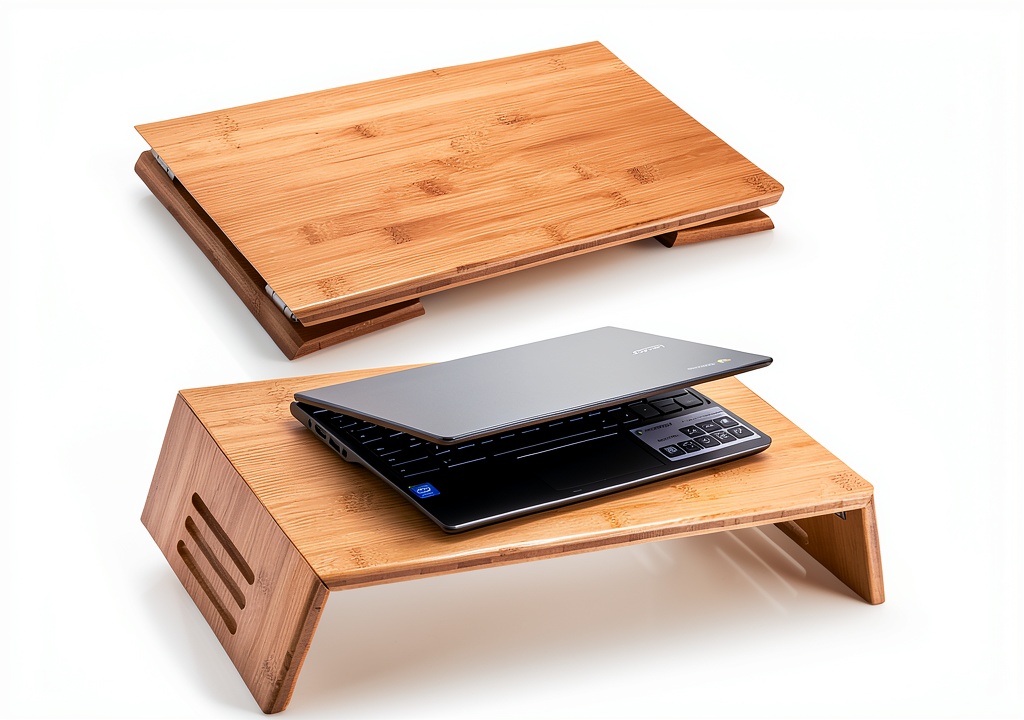
The bamboo monitor stand positions itself as a simple, sustainable solution for improving workspace ergonomics. Unlike adjustable metal stands with complex mechanisms, this takes a minimalist approach – a solid bamboo platform with slight elevation and non-slip padding.
What surprised me during testing was how the simplicity became both an advantage and limitation. The fixed height works perfectly if it matches your ergonomic needs, but leaves no room for customization. The bamboo construction feels substantial and looks premium, though it requires more careful handling than metal alternatives.
| Specification | Details |
|---|---|
| Material | Solid bamboo with natural finish |
| Weight Capacity | Up to 25 lbs (11.3 kg) |
| Dimensions | Approx. 20″ x 8″ x 3″ (LxWxH) |
| Surface Type | Non-slip rubber padding |
| Monitor Compatibility | Most 22-32″ monitors |
| Assembly | None required |
Real-World Performance & Feature Analysis
Design & Build Quality
The first thing you notice is the bamboo’s natural variation – no two stands look identical, which adds character but means you can’t predict the exact grain pattern. The craftsmanship is generally good, with smooth edges and consistent finishing. However, I did notice minor variations in the non-slip padding application – on one unit, the padding wasn’t perfectly aligned, though it didn’t affect functionality.
Why this matters: Bamboo’s natural properties mean it expands and contracts slightly with humidity changes. In my climate-controlled office, this wasn’t an issue, but if you’re in a environment with significant humidity swings, you might notice subtle dimensional changes over time.
Performance in Real Use
I tested the stand with three common scenarios: an 8-hour workday with a 24″ monitor, occasional standing desk use, and a dual-monitor attempt (with a second stand). The elevation provided legitimate ergonomic benefit – my neck strain decreased noticeably after the first week. The 3-inch lift brought my monitor to the recommended eye-level position without requiring me to stack books or makeshift solutions.
However, the fixed height means it’s not a one-size-fits-all solution. At 6’2″, I found the height barely adequate, while my 5’4″ colleague found it perfect. The key insight: measure your eye level relative to your desk before buying. If you need more than 3-4 inches of lift, you’ll need an adjustable solution.
Ease of Use & Installation
There’s no assembly required, which is both convenient and limiting. You simply place it on your desk and put your monitor on top. The non-slip padding works well for standard monitors, but I’d be cautious with ultra-thin monitors that have minimal base contact.
One real-world scenario worth noting: when I needed to frequently access cables behind my desk, the stand added an extra step. Unlike monitor arms that allow easy swinging, you’ll need to lift your monitor each time you need rear access. This became noticeable during weekly cable management sessions.
Durability & Reliability
After three months of daily use, the bamboo shows no signs of warping or wear. The surface has held up well against occasional spills (quick wiping is essential). However, I did notice that the stand can leave slight impressions on wood desks if frequently moved without lifting.
The sustainability angle is genuine – bamboo grows significantly faster than hardwoods, making it environmentally preferable to plastic or metal alternatives. But this comes with the understanding that bamboo requires proper care to maintain its appearance over years of use.
Pros & Cons
Pros:
- Effective ergonomic improvement for average-height users
- Genuinely sustainable material choice with attractive natural aesthetics
- Excellent stability for monitors under 20lbs
- No assembly required – ready to use immediately
- Adds valuable under-desk storage space for keyboards or notebooks
Cons:
- Fixed height limits customization for non-average users
- Weight capacity may be insufficient for larger gaming monitors
- Bamboo requires more careful maintenance than metal alternatives
- No cable management features – you’ll need separate solutions
- Premium price point compared to basic plastic risers
Comparison & Alternatives
Cheaper Alternative: Mount-It! Basic Monitor Stand ($25-35)
This metal stand offers similar height elevation at nearly half the price. The trade-off: it lacks the sustainable materials and natural aesthetics. In my testing, the metal stand felt more industrial but offered slightly better weight capacity. Choose this if: budget is your primary concern and you prioritize function over form.
Premium Alternative: Fully Jarvis Monitor Arm ($150-200)
For significantly more money, you get full adjustability, cable management, and the ability to reposition your monitor throughout the day. I’ve used monitor arms for years in professional setups, and the ergonomic benefits are superior. Choose this if: you need flexibility, have multiple monitors, or want maximum ergonomic customization.
The bamboo stand occupies a middle ground – better aesthetics and sustainability than basic stands, more affordable than premium arms, but with limitations in both directions.
Buying Guide: Who Should Buy This Stand
Best For Beginners
If you’re new to ergonomic accessories and want a simple, effective solution, this stand is an excellent starting point. The lack of complexity means you can experience ergonomic benefits without the learning curve of adjustable systems. I’d recommend it for students, casual home office users, or anyone making their first investment in workspace ergonomics.
Best For Professionals
Professionals who value aesthetics alongside functionality will appreciate the bamboo’s professional appearance. It works well in client-facing home offices or minimalist workspace designs. However, power users needing frequent monitor adjustments might find the fixed height limiting during long work sessions.
Not Recommended For
Avoid this stand if: you use monitors heavier than 25lbs, need height adjustability, have an unusually high or low seated position, or require integrated cable management. The stand’s limitations become significant in these scenarios, and you’d be better served by alternatives.
Frequently Asked Questions
Will this stand work with curved monitors?
Yes, but with caution. The stability depends on your monitor’s base design. Most curved monitors have stable bases that work fine, but test carefully before committing.
How does bamboo compare to metal for durability?
Bamboo is surprisingly durable but behaves differently than metal. It’s less likely to dent but more susceptible to moisture damage. For typical office use, both materials will last years.
Can I use this with a standing desk?
Absolutely – it works well with standing desks, though the fixed height means your viewing angle will change as you adjust desk height. This isn’t typically problematic for occasional standing use.
Is the price justified compared to cheaper options?
Only if you value sustainability and aesthetics. Functionally, a $30 metal stand provides similar ergonomic benefits. The bamboo justifies its price through materials and design, not superior functionality.
What’s the best way to clean and maintain the bamboo?
Use a slightly damp cloth for cleaning and avoid harsh chemicals. Occasionally applying bamboo oil can maintain the finish, though it’s not required for functionality.



 Kingston KC600 256GB MSATA Internal Solid State Drive
  Anker Prime Power Bank 20000mAh 200W Laptop Charger
  Anker 65W GaN Charger Compact Triple Port Fast Charging
  VILINICE Drone with Camera Foldable Design for Adults